Building a Realtime App with Cloudflare Durable Objects and WebSockets
The first time I built something realtime, I did it with polling. Every two seconds the browser asked the server “anything new?” and the server said “no” about 95% of the time. It worked. It also hammered the server, wasted battery, and still felt laggy, because “realtime” meant “up to two seconds ago.”
WebSockets fix that. One connection stays open, and either side can talk whenever it wants. Chat, live dashboards, multiplayer cursors, notifications, order tracking: this is what they’re for.
But the moment you try to ship one, a different problem shows up. Not “how do I open a socket” but “what happens when I need two servers?” Suddenly user A is connected to one machine, user B to another, and they’re in the same room. You need Redis, pub/sub, sticky sessions, a load balancer with the right timeouts. A lot of plumbing for what started as 30 lines of code.
Cloudflare Durable Objects take a different angle that I find genuinely pleasant. This article walks through building a small chat room with them, and why the model makes the scaling headache mostly go away.
Polling vs WebSockets, quickly
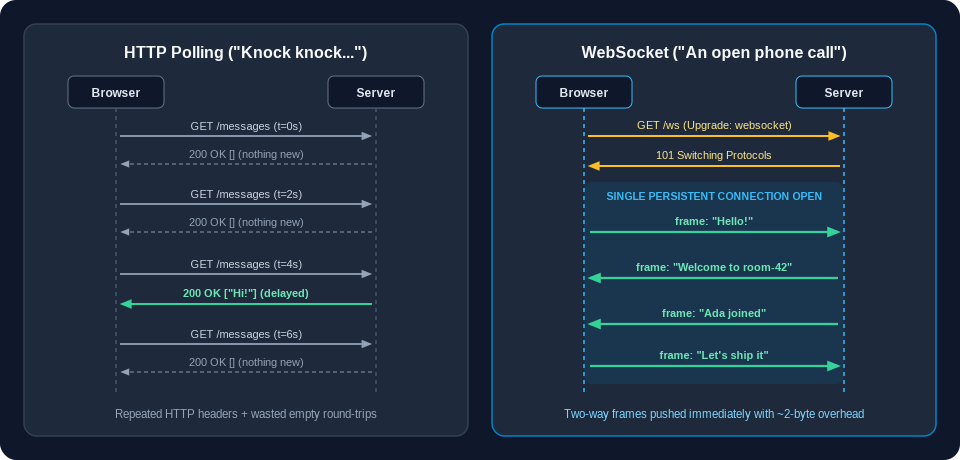
With normal HTTP the client asks, the server answers, and the conversation is over. To get updates the client has to keep asking.
A WebSocket starts as a normal HTTP request with a header asking to “upgrade.” If the server agrees, the connection switches protocols and stays open. After that, both sides can send messages at any time with very little overhead.
Do you always need WebSockets? No. If updates are rare or one-directional, Server-Sent Events are simpler. If a refresh every 30 seconds is fine, plain polling is fine. WebSockets earn their place when you need frequent two-way traffic.
What is a Durable Object, in plain words?
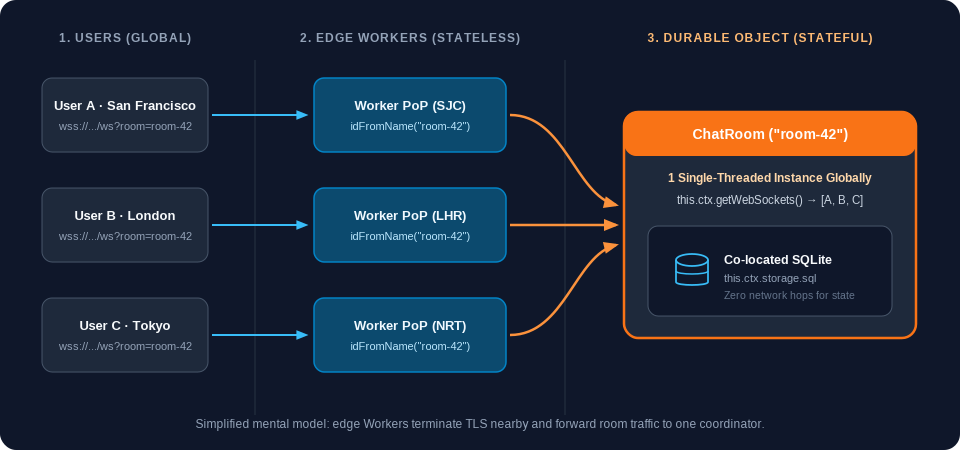
Cloudflare Workers are small functions that run close to your users. They’re stateless: any request can land on any machine in any city, and nothing is remembered between requests. Great for scaling, awkward for anything that needs to coordinate people.
A Durable Object is a Worker with two extra properties:
- There is exactly one instance of it per ID, anywhere in the world. If you ask for the object named
room-42, every request, from anywhere, is routed to the same single instance. - It has its own private storage that lives with it.
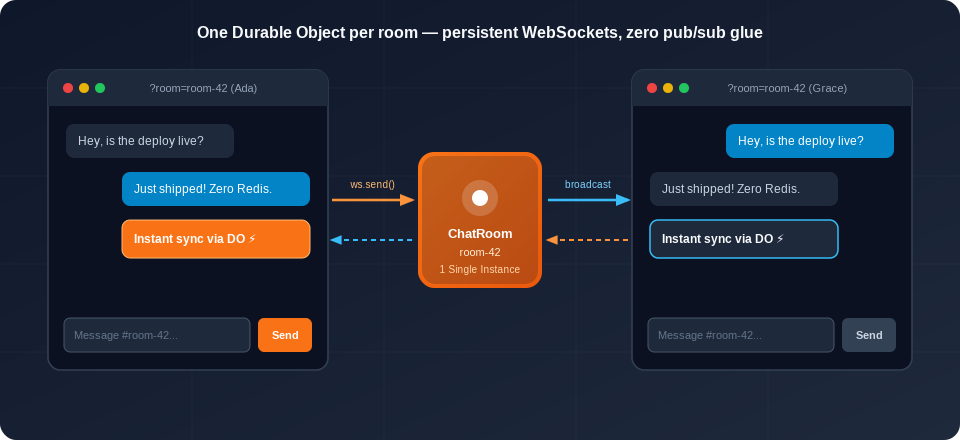
That’s the whole trick. If one object is the chat room, then everyone in that room connects to the same place. There’s no “which server is my friend on?” question. No pub/sub layer. No shared Redis. The object holds the sockets, receives each message, and sends it out to the others, all in one place.
It’s single-threaded too, so you don’t need locks to stop two messages trampling each other. They’re handled one at a time.
The plan
We’ll build a small chat room:
- A Worker that accepts the WebSocket upgrade and routes it to the right room
- A
ChatRoomDurable Object that holds the connections and the message history - A browser client with heartbeat and reconnection
- Deploy with Wrangler
You’ll need a free Cloudflare account and Node installed.
1. Set up the project
npm create cloudflare@latest realtime-chat
cd realtime-chat
Pick the plain “Hello World” Worker. Then make wrangler.jsonc look like this:
{
  "name": "realtime-chat",
  "main": "src/index.js",
  "compatibility_date": "2025-01-01",
  "durable_objects": {
    "bindings": [{ "name": "CHAT_ROOM", "class_name": "ChatRoom" }]
  },
  "migrations": [{ "tag": "v1", "new_sqlite_classes": ["ChatRoom"] }],
  "assets": { "directory": "./public" }
}
Three things worth knowing:
- The binding is how your Worker gets a handle on the Durable Object namespace (
env.CHAT_ROOM). - The migration tells Cloudflare that a new Durable Object class exists. You write one whenever you add, rename, or delete a class.
new_sqlite_classesgives the object SQLite-backed storage, which is what Cloudflare currently recommends for new projects. - The assets folder is where our
index.htmlgoes, so one deploy serves both the page and the socket.
2. The Worker and the Durable Object
Everything fits in a single file.
// src/index.js
import { DurableObject } from "cloudflare:workers";

// The front door: a normal Worker that picks a room and forwards the request.
export default {
  async fetch(request, env) {
    const url = new URL(request.url);
    if (url.pathname !== "/ws") return new Response("Not found", { status: 404 });

    if (request.headers.get("Upgrade") !== "websocket") {
      return new Response("Expected a WebSocket", { status: 426 });
    }

    const roomName = (url.searchParams.get("room") || "lobby").slice(0, 50);
    const id = env.CHAT_ROOM.idFromName(roomName);   // same name -> same object, always
    return env.CHAT_ROOM.get(id).fetch(request);
  },
};

// The room itself.
export class ChatRoom extends DurableObject {
  constructor(ctx, env) {
    super(ctx, env);

    this.ctx.storage.sql.exec(`
      CREATE TABLE IF NOT EXISTS messages (
        id INTEGER PRIMARY KEY AUTOINCREMENT,
        body TEXT NOT NULL,
        created_at INTEGER NOT NULL
      )
    `);

    // Answer "ping" with "pong" without waking the object up (more on this below).
    this.ctx.setWebSocketAutoResponse(
      new WebSocketRequestResponsePair("ping", "pong")
    );
  }

  async fetch(request) {
    const { 0: client, 1: server } = new WebSocketPair();

    // Hand the socket to the runtime. This enables hibernation.
    this.ctx.acceptWebSocket(server);

    // Catch the client up on anything it missed while it was away.
    const since = Number(new URL(request.url).searchParams.get("since") || 0);
    const missed = this.ctx.storage.sql
      .exec("SELECT id, body FROM messages WHERE id > ? ORDER BY id LIMIT 100", since)
      .toArray();
    for (const m of missed) server.send(JSON.stringify(m));

    return new Response(null, { status: 101, webSocket: client });
  }

  // Called for each incoming message.
  async webSocketMessage(ws, message) {
    if (typeof message !== "string" || message.length > 2000) return;

    const { id } = this.ctx.storage.sql
      .exec("INSERT INTO messages (body, created_at) VALUES (?, ?) RETURNING id",
            message, Date.now())
      .one();

    const payload = JSON.stringify({ id, body: message });
    for (const peer of this.ctx.getWebSockets()) peer.send(payload);
  }
}
That’s the whole backend. Take a second to notice what isn’t there: no list of connections to maintain, no ping loop, no Redis client, no process manager, no reverse proxy config. this.ctx.getWebSockets() gives you every live connection to this room.
The part that makes it cheap: hibernation
Look closely at this.ctx.acceptWebSocket(server). That one line is different from the usual server.accept() you’d see in a plain Worker, and it matters.
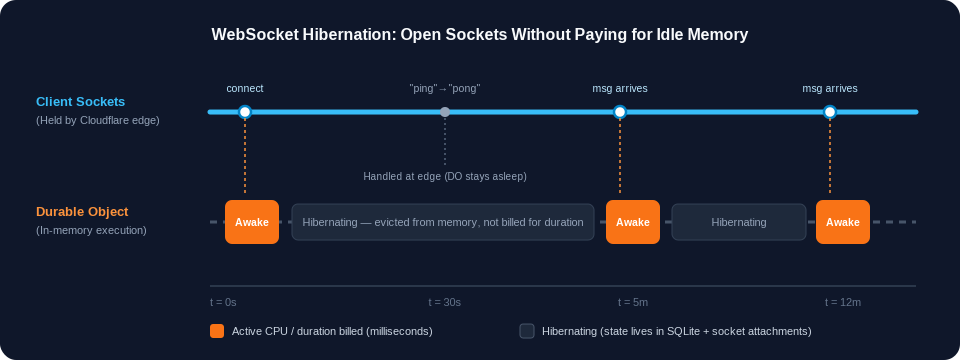
With the WebSocket Hibernation API, the sockets stay connected, but the Durable Object itself can be evicted from memory while nothing is happening. When a message arrives, Cloudflare wakes it up and calls webSocketMessage. Idle rooms cost you (almost) nothing, because you’re billed for the time the object is actually running, not for how long users leave a tab open.
Two consequences you should know about:
- In-memory variables are lost when the object hibernates. If you stored the list of users in a
this.users = [], it vanishes. Anything you need to survive goes in storage (like our SQLite table), or in the small per-socket “attachment” described below. - The auto-response is a neat trick. Heartbeat pings are the classic way to keep connections alive and detect dead ones. If they wake the object every 30 seconds, you lose the hibernation savings.
setWebSocketAutoResponselets the runtime answer “ping” with “pong” on its own, without waking your code.
Per-connection state, like a username, can ride along with the socket itself:
ws.serializeAttachment({ name: "Ada" });      // when they join
const { name } = ws.deserializeAttachment();  // later, even after hibernation
Attachments are small (the docs cap them at 2 KB), so treat them as a place for an ID or a nickname, not a data store.
3. The client
Connections will drop. Phones switch networks, laptops sleep, the object gets restarted during a deploy. What matters is that the client recovers by itself and doesn’t lose messages.
Put this in public/index.html:
<ul id="log"></ul>
<form id="form"><input id="msg" autocomplete="off" /><button>Send</button></form>

<script>
  const log = document.getElementById("log");
  const room = new URLSearchParams(location.search).get("room") || "lobby";
  let socket, attempt = 0, lastId = 0, heartbeat;

  function connect() {
    const proto = location.protocol === "https:" ? "wss" : "ws";
    socket = new WebSocket(
      `${proto}://${location.host}/ws?room=${encodeURIComponent(room)}&since=${lastId}`
    );

    socket.onopen = () => {
      attempt = 0;
      heartbeat = setInterval(() => socket.send("ping"), 30000);
    };

    socket.onmessage = (e) => {
      if (e.data === "pong") return;
      const msg = JSON.parse(e.data);
      if (msg.id <= lastId) return;            // already seen
      lastId = msg.id;
      const li = document.createElement("li");
      li.textContent = msg.body;               // textContent, never innerHTML
      log.appendChild(li);
    };

    socket.onclose = () => {
      clearInterval(heartbeat);
      // Exponential backoff with jitter, capped at 30 seconds
      const delay = Math.min(30000, 1000 * 2 ** attempt++) * (0.5 + Math.random() / 2);
      setTimeout(connect, delay);
    };
  }

  document.getElementById("form").onsubmit = (e) => {
    e.preventDefault();
    const input = document.getElementById("msg");
    if (socket.readyState === WebSocket.OPEN && input.value) {
      socket.send(input.value);
      input.value = "";
    }
  };

  connect();
</script>
A few details I’d point out:
since=lastId. On every reconnect the client says “the last message I saw was number 17.” The room replays anything after that from its SQLite table. A WebSocket is not a durable queue, so if you don’t build catch-up, anyone who blips offline silently misses messages.- Backoff with jitter. If a deploy kicks off thousands of clients at once and they all retry at the same instant, you get a stampede. Randomising the delay spreads them out.
textContent, notinnerHTML. Whatever one user sends gets rendered in other people’s browsers. Treat it as hostile.
4. Run it and ship it
Locally:
npx wrangler devOpen http://localhost:8787 in two tabs and chat with yourself. Try ?room=secret in one of them to see rooms stay separate.
Then deploy:
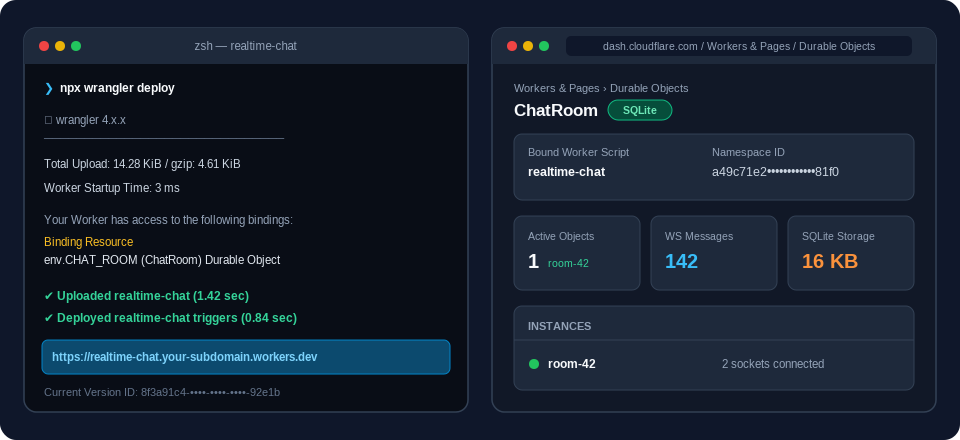
npx wrangler deployYou get a *.workers.dev URL straight away, with HTTPS already working. No server to provision, no Nginx upgrade headers to get wrong, no certificate renewal. Add a custom domain later from the dashboard if you want one.
Where this model shines, and where it doesn’t
I like Durable Objects a lot for this, but let me be straight about the trade-offs.
Good fit:
- Anything that is naturally “a room”: chat, a shared document, a multiplayer game lobby, a live auction, a collaborative whiteboard.
- Apps with lots of small independent groups. Each room is its own object, so they scale out by themselves.
- Teams that don’t want to run servers.
Think harder when:
- One enormous room. All the traffic for a given object goes through one single-threaded instance. A room with a handful or a few hundred people is great. A room with hundreds of thousands of people watching a live event will hit limits. Check Cloudflare’s current documented limits, and consider sharding the room or fanning out through another layer.
- You need cross-room queries. Each object has its own storage. “Show me every message from every room” means collecting from many objects or mirroring to a central database (D1, for instance).
- Lock-in. The Durable Objects API is Cloudflare-specific. Your logic ports; the plumbing doesn’t.
- Cost surprises. Pricing involves requests, duration while awake, and storage, and WebSocket messages count toward request billing at a reduced ratio. Read the pricing page and run a back-of-the-envelope estimate for your traffic before you launch.
Things I’d tell my past self
Authenticate before you accept. Browsers can’t set custom headers on a WebSocket handshake, so people end up putting tokens in the query string, which then shows up in logs. A safer pattern: get a short-lived, single-use ticket from your normal authenticated HTTP endpoint, then verify it in the Worker before forwarding to the room.
Validate everything. We capped message size at 2,000 characters. In a real app, also rate-limit per connection so one noisy client can’t flood a room.
Remember hibernation when debugging. If a bug only shows up “after a while,” suspect lost in-memory state. Move it into storage or an attachment.
Test with real latency. Localhost makes everything feel instant. Throw your phone on mobile data and see what reconnection looks like in practice.
Prune your history. Our table grows forever. Delete old rows, or set an alarm on the object (Durable Objects have an alarm API) to clean up on a schedule.
Wrapping up
A realtime backend usually means a pile of infrastructure: servers, a proxy, a pub/sub layer, health checks, timeouts. The fun of Durable Objects is that the shape of the problem changes. Instead of “how do I get messages between machines?”, it becomes “this room is one object, and everybody talks to it.”
The code above is about 60 lines of server and 40 of client. That’s not a toy limit, that’s genuinely what a small realtime feature needs once the platform stops making you build the plumbing yourself.
Next up I’d want to add presence (“who’s online”) and typing indicators. Both fall out of getWebSockets() and attachments with almost no extra effort.
Editing note: Durable Objects evolve quickly, so check Cloudflare’s current docs for the Hibernation API method names, the storage and connection limits, the attachment size cap, free-plan availability, and pricing. The compatibility_date and new_sqlite_classes migration style reflect current guidance as I know it.